

TL;DR
Manufacturing today demands seamless integration of production, inventory, quality, and finance. Many still use fragmented tools causing delays and errors. This guide helps founders and tech leaders decide between building or buying ERP software by focusing on fit, deployment, and cost over five years. It covers essential modules, key features, benefits, vendor comparisons, and decision criteria to confidently choose the right manufacturing ERP system.
Make a summary of this article with AI:

Modern manufacturing requires coordination across production, inventory, quality, and finance – but many companies still rely on disconnected tools that create information gaps and operational bottlenecks. For founders and tech leaders weighing a build-vs-buy decision, the practical question isn’t which vendor has the flashiest demo. It’s about which system fits your production complexity, deployment needs, and total cost over the next five years.
This guide walks through the module architecture, the features that actually matter on the shop floor, quantified benefits, a six-vendor comparison, selection criteria, and the custom-versus-off-the-shelf call. You’ll get the framework to make that decision with confidence, not guesswork. Start with the foundation: what manufacturing ERP really is, and how it differs from generic business software.
What Is ERP For Manufacturing?
ERP for manufacturing is a centralized software system that connects production, inventory, quality, and finance into a single shared database. So what does ERP stand for in manufacturing? Enterprise resource planning – the discipline of running the whole operation from one source of truth instead of a dozen disconnected spreadsheets.
The difference from generic business software is structural, not cosmetic. A standard ERP handles accounting, sales, and basic inventory well enough. But an ERP system for manufacturing is built around bills of materials (BOM), work orders, and shop floor control – the mechanics of actually making things.
Four modules do the heavy lifting. The production management module schedules work orders and tracks output against capacity. The inventory management module records raw materials, work in progress, and finished goods across locations, along with material and labor variances. The quality control module ties inspections and nonconformance handling to specific lots. And the finance and accounting module ties every transaction back to real production costs.
Here’s why that matters for you as a decision-maker. When these four modules share one database, a material shortage flagged on the floor updates the schedule and the cost forecast at the same time – no manual reconciliation needed. Generic platforms treat production as an afterthought, forcing expensive add-ons. Purpose-built manufacturing ERP software includes MRP and traceability from day one. That’s the core distinction across the ERP for the manufacturing industry. Understanding what manufacturing ERP is sets up the next question: which specific features actually move the needle on the shop floor?
Key Features of Manufacturing ERP Software

Seven features separate real manufacturing ERP software from a repurposed generic system. Miss any of them, and you’re back to bolting on spreadsheets.
Start with MRP-driven production planning. Master production scheduling, material requirements planning, and capacity planning work together so that when MRP spots a material shortage, it adjusts the schedule and generates purchase orders automatically. No manual chase.
Next comes inventory and warehouse control – tracking raw materials, work-in-progress, and finished goods across locations. This is the same discipline that drives serious inventory management software development and is applied to production. Quality management ties inspections and nonconformance handling to specific lot IDs, not loose paperwork.
Supply chain visibility matters just as much. Knowing where a shipment sits and when keeps the schedule honest – the same principle behind purpose-built ERP solutions for logistics. Integrated financials complete the loop. Every material and labor transaction ties back to real production cost, so margins aren’t a quarterly guess.
Then there’s shop floor data collection. Modern systems capture order progress, completions, scrap, and labor in real time via barcode, RFID, or mobile inputs. Would you rather learn about a bottleneck today or at month-end?
Finally, traceability for compliance. The ERP becomes the auditable chain linking raw material receipt to shipment history – essential when a food or pharma auditor asks you to trace a lot in minutes. That’s what an ERP software for manufacturing actually delivers. These features aren’t just checkboxes – each one translates into measurable operational and financial gains.
Benefits of ERP Systems for Manufacturers
The business case for ERP for manufacturing rests on gains you can measure, not vague promises. Six benefits show up again and again when the rollout is done right.
Efficiency comes first. Automated workflows can increase production turnaround time by up to 1.5x, according to research on ERP ROI for manufacturers. Less manual data entry, fewer handoffs, faster output.
Cost reduction follows close behind. That same research links ERP to a 22% drop in operational costs by optimizing labor, materials, and machine time. Real-time visibility and inventory optimization change how you plan. Better stock tracking can cut inventory waste by up to 60% – capital that stops sitting on shelves. Pairing your ERP with cloud-based supply chain software further sharpens that picture.
Regulatory compliance shifts from a scramble to routine. When every lot, inspection, and shipment lives in one auditable chain, a recall or audit becomes a query, not a fire drill. Better forecasting depends on clean, connected data. Industry data show that AI-assisted ERP can meaningfully improve demand forecasting accuracy, so you order and staff based on real signals rather than gut feel.
Reduced downtime rounds out the list. Would you rather schedule maintenance or absorb a surprise line stoppage? Predictive maintenance tied to ERP work-order history can cut unplanned downtime substantially – one steel manufacturer traced failures weeks ahead.
For a manufacturing company, these ERP solutions turn scattered effort into measurable margin. Do the rollout well, and the numbers add up. With the business case established, the next step is knowing which platforms actually deliver on these benefits.
Top ERP Solutions For Manufacturing Companies
Picking the best ERP software for manufacturing isn’t about chasing a leaderboard. It’s about matching three variables to your operation: industry fit, deployment flexibility, and total cost against your production complexity.
Three names round out the shortlist beyond the six covered below. QAD Adaptive suits regulated global manufacturers – automotive, life sciences, CPG – with multi-level BOM control and FDA/ISO 13485 compliance baked in. Cetec ERP targets small job shops and contract manufacturers, with transparent per-user pricing and strong cost accounting. Global Shop Solutions, family-owned since 1976, focuses squarely on discrete manufacturing with its FLOOOM operation-level cost breakdown.
Which one fits you? That typically depends on whether you run simple assemblies or batch chemistry, and whether you need cloud speed or on-prem control.
| Attribute | QAD Adaptive | Cetec ERP | Global Shop Solutions |
|---|---|---|---|
| Best fit | Regulated global mfg | Small job shops | Discrete manufacturing |
| Strength | Compliance, traceability | Cost accounting | Shop management |
| Deployment | Flexible | Cloud | Cloud or on-prem |
These aren’t the only contenders, but they show the range across ERP systems for manufacturing – from lightweight cloud tools to enterprise vertical suites. Choosing among the top ERP systems for manufacturing is a build-vs-buy decision with real cost consequences. Tell us about your project and get a clear development roadmap from our team.
Here’s how six leading platforms stack up on manufacturing-specific capability.
NetSuite
NetSuite is cloud-native from the ground up, which is why growing manufacturers gravitate toward it. Financials and production management live in the same suite – not two products stitched together after the fact.
That unified design pays off when you scale. A company outgrowing QuickBooks and a standalone MRP tool can consolidate both into one system, so a work order booked on the floor updates the general ledger without a second entry.
Where does it fit best? Mid-market manufacturers who want strong accounting depth alongside solid production and inventory control, without maintaining servers. The trade-off is customization cost. Heavy shop-floor complexity can push you toward a deeper vertical suite. But for financials-first operations, you’ll find the single-database approach hard to beat.
Epicor Kinetic
Epicor Kinetic goes deep where discrete manufacturers feel the most pain. Its industry-specific functionality is among the richest on the market, built for shops running complex, multi-level BOMs and intricate routings.
If your product has dozens of subassemblies and revision-controlled components, this is where Kinetic earns its keep. A make-to-order machine builder juggling engineering changes across active work orders gets granular control that lighter platforms simply gloss over.
The depth comes with a learning curve – you’ll want a capable implementation partner. But for discrete manufacturers whose competitive edge lives in production complexity, that trade is usually worth it. Need broad global finance instead? Then look at the enterprise pick next.
SAP S/4HANA
SAP S/4HANA is the enterprise pick – the one large manufacturers reach for when scale and regulation collide. It’s built for complex global operations, multi-entity finance, and cross-border compliance that lighter platforms can’t touch.
Think of a manufacturer running plants across three continents, consolidating results in multiple currencies while satisfying different regulatory regimes. That’s the environment where S/4HANA fits. The cost and implementation weight are real – this is enterprise software priced and scoped for enterprises. You’ll need dedicated IT and a serious change-management budget. But if your operation spans borders, entities, and strict compliance obligations, few systems match its depth. For everyone else, it’s more than you need.
Acumatica Cloud ERP
Acumatica prices differently, and that changes the math for mid-market manufacturers. Instead of charging per seat, it licenses on consumption – so you can add shop-floor users without a penalty for every login.
Picture a growing manufacturer that wants supervisors, planners, and machine operators all touching the system. Under per-seat pricing, that ambition gets expensive fast. Under Acumatica’s model, it doesn’t. The cloud flexibility rounds out the appeal – you scale capacity as production grows, not in costly jumps. Why cap who sees the data when access drives better decisions? For mid-market operations focused on total cost of ownership, that licensing structure is why Acumatica keeps making the shortlist.
Microsoft Dynamics 365 Business Central
Business Central makes the most sense when your team already lives in Microsoft 365. The integration is tight – Power BI dashboards, Excel exports, and Outlook workflows connect without middleware.
That familiarity lowers switching costs in a real way. A manufacturer whose finance team runs on Excel and whose planners already use Teams can adopt Business Central without retraining everyone from scratch.
Where does it shine? Small to mid-market manufacturers who value one vendor relationship and predictable licensing over deep vertical features. The manufacturing depth is solid rather than specialized – fine for standard discrete production, less so for heavy process complexity. But if you’re a Microsoft shop, you’ll appreciate how little friction the rollout brings.
Infor CloudSuite Industrial
Infor CloudSuite Industrial covers ground most platforms don’t – it handles both process and discrete manufacturing under one roof. That range matters if your operation blends batch chemistry with assembly work.
Its edge is the speed to deploy. Industry-specific templates come preconfigured for verticals, so you spend less time bending a generic system to fit and more time running it. A specialty coatings maker running formulations alongside packaged goods gets a starting point that already understands both.
Where does it fit? Manufacturers who want vertical depth without the enterprise weight of the largest suites. You’ll trade some raw flexibility for a faster, lower-risk rollout.
Interesting
Picking a name off this list is only half the job – the next step is matching platform capability to your specific selection criteria.
How to Choose the Best ERP for Manufacturing
Six criteria decide whether you pick well or spend two years regretting it. Work through them in order, and the shortlist narrows fast.

Industry fit comes first. A process manufacturer running batch chemistry needs formulation and lot genealogy that a discrete-focused platform treats as an afterthought. Match the system to how you actually make things.
The deployment model is next. On-prem maximizes control in latency-sensitive or regulated environments but increases your IT burden and upfront capital requirements. Cloud offers faster time-to-value and lower initial costs – and it can cut total cost of ownership by 30-50% over five years, according to an analysis comparing cloud and on-premises ERP.
Scalability matters because you’re buying for the operation you’ll run in five years, not today. Can the system absorb a 50% jump in transaction volume without a re-platform? Integration with existing systems is where many rollouts stall. Your ERP has to talk to shop-floor hardware and your CRM – plan to integrate ERP with custom CRM development rather than run parallel databases.
Total cost of ownership means the full 3-7 year picture: licensing, implementation, and support, not the sticker price. Vendor support quality decides your experience after go-live. Weigh implementation expertise and long-term stability – or work with an experienced ERP development company to bridge gaps. Score every ERP for manufacturing candidate against all six, and the best ERP for manufacturing surfaces on its own. These criteria play out differently depending on whether you’re a five-person shop or a multi-plant enterprise.
ERP for Small Manufacturers VS Enterprise Needs
The gap between what a job shop pays and what a multi-plant enterprise pays isn’t a rounding difference – it’s an order of magnitude.
ERP for small-business manufacturing typically runs $10,000-$150,000 in year one, including implementation, then $15,000-$75,000 annually. A 20-employee shop often lands near $50,000-$75,000 total. That’s affordable because cloud-based ERP software for small manufacturing businesses skips servers and dedicated IT entirely.
Enterprise sits elsewhere. Deployments exceed $250,000 and routinely climb past $1,000,000 with multi-entity finance and heavy customization. Implementation runs 2-5x the annual license on enterprise platforms, versus 1-3x on mid-market systems. Which side of the line are you on? If you can’t dedicate an internal team, the small-business path is usually the honest one.
| Attribute | Small manufacturer | Enterprise |
|---|---|---|
| Year-one cost | $10K-$150K | $250K-$1M+ |
| Deployment | Cloud, no servers | On-prem or hybrid |
| Implementation ratio | 1-3x license | 2-5x license |
| IT requirement | Minimal | Dedicated team |
Cloud dominates the small end because it suits ERP software for manufacturing budgets without upfront hardware. Manufacturing leads ERP adoption, and smaller buyers grow fastest. You need a system sized to your operation. Budget fit is one hurdle – the rollout itself introduces separate risks worth planning for upfront.
Common Challenges In Implementing Manufacturing ERP
Most ERP rollouts don’t fail because the software is broken. They fail for predictable reasons you can plan around before signing a contract.
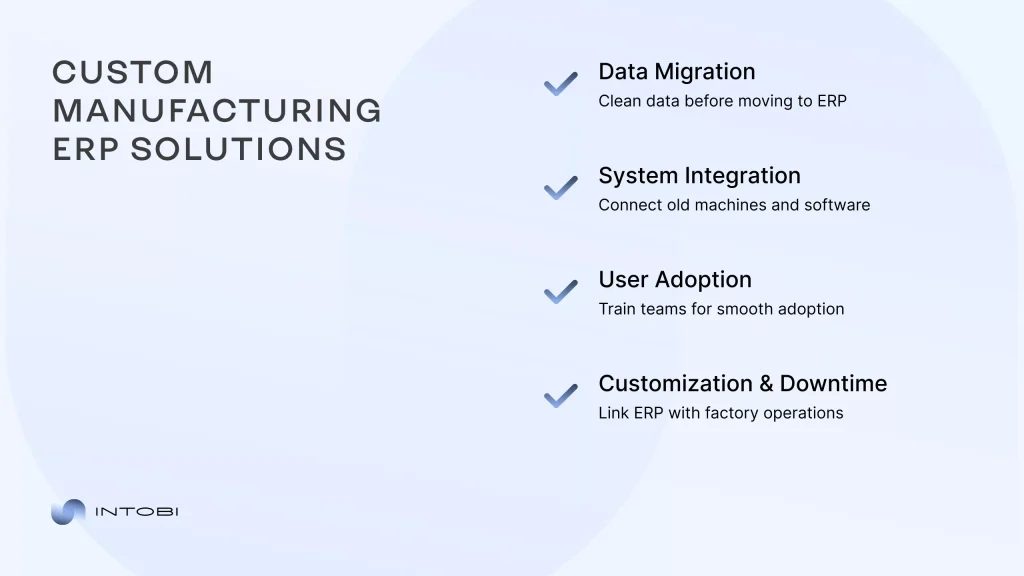
Data migration is the biggest culprit. It accounts for over 75% of implementation issues, according to research on ERP data migration for manufacturers. Inconsistent BOMs, duplicate part numbers, and fields that don’t map cleanly produce unreliable schedules and wrong inventory. Budget migration at 20-30% of effort and clean data before it moves.
Change management is the quiet killer. When operators and planners aren’t brought along, they route around the system – and the new platform ends up half-used. It ranks among the top causes of failed discrete rollouts.
Then there’s legacy equipment integration. Older CNC machines and PLCs predate modern APIs, stranding data in MES, SCADA, or local databases. Without a connection, the ERP leans on slow, error-prone manual input. An IoT gateway that speaks Modbus or OPC UA bridges that gap, but it’s real engineering work. Purpose-built custom supply chain software for manufacturers often handles that layer.
Customization limits and rollout downtime add friction. Push a generic platform too far, and the cost spiral ensues. Cut over all at once, and you risk stopping the line. Would you rather uncover these gaps in planning or after go-live? Manage them deliberately, and your ERP for the manufacturing industry rollout beats the odds. Some challenges are exactly why off-the-shelf ERP isn’t right for every manufacturer.
Custom ERP vs Off-the-Shelf For Manufacturers
Off-the-shelf ERP is the right default for standard discrete manufacturing. If your workflows map cleanly onto a packaged template, buying beats building.
The picture changes when your operation doesn’t fit the mold. Process manufacturers – chemicals, pharmaceuticals, food and beverage – need formulation, batch genealogy, and regulatory traceability that generic platforms handle inconsistently. Bend a packaged system too far, and you inherit brittle add-ons that break at every upgrade.
Three signals push toward custom. Regulatory traceability packaged modules can’t satisfy. Legacy equipment integration where 20-year-old PLCs won’t talk to a modern API. And non-standard workflows reflecting a real competitive edge.
Consider a packaging company whose legacy ERP lacked a direct API, resulting in inventory lag. A custom integration layer restored order without ripping out the core. That’s often the smarter play – custom ERP development for manufacturers can wrap a legacy system rather than replace it.
| Attribute | Off-the-shelf ERP | Custom ERP |
|---|---|---|
| Best fit | Standard discrete mfg | Regulated or niche mfg |
| Deploy speed | Faster | Slower |
| Workflow match | Generic template | Exact fit |
| Upgrade risk | Low | Controlled |
Would you force a batch-chemistry operation into discrete-manufacturing logic? These ERP solutions for manufacturing serve different jobs. If you’re weighing ERP for custom manufacturing, learn how to build an ERP system from scratch before committing. Tell us about your project and get a clear roadmap. We’ve guided manufacturers through exactly this build-vs-buy decision.
What We’ve Seen Work: Lessons From Custom Manufacturing ERP Builds
Custom ERP projects that succeed follow a recognizable pattern. The ones that stall almost always skip one of the three disciplines.
First, scope traceability and BOM logic before anyone writes code. Multi-level bills of materials, revision control, and lot genealogy are the hardest parts of any manufacturing build – and the most expensive to bolt on late. Map how a serialized part moves from raw receipt to shipment first. Everything else hangs off that spine.
Second, migrate data in phases, not in one heroic cutover. A single overnight switch is how you strand production the next morning. Moving master data, then transactions, then history in stages lets you validate BOMs and inventory counts before they drive live schedules. Would you bet the whole line on a single migration script running cleanly?
Third, treat shop-floor hardware integration as its own workstream with its own budget. Connecting older CNC machines and PLCs through an IoT gateway is real engineering, not a configuration checkbox. Teams that fold it into “general implementation” watch timelines slip.
One recurring lesson ties them together: the software rarely fails on its own. Weak data hygiene and rushed rollouts do the damage.
Plan these three upfront, and you’ll spend your budget on capability instead of rework. That’s the difference between a custom build that pays back and one that drags.
Need an ERP that fits your shop floor?
Contact us
The Bottom Line On Manufacturing ERP
An ERP for manufacturing earns its keep when it integrates production, inventory, quality, and finance into a single source of truth. The platform you pick matters less than the fit – industry type, deployment model, and total cost against your real production complexity.
Small shops thrive on cloud systems that skip servers and IT overhead. Enterprises need multi-entity depth and to accept the weight that comes with it. And when packaged templates can’t handle your batch chemistry or legacy PLCs, a custom build or integration layer often beats bending a generic system until it breaks.
Failures rarely stem from bad software. They come from dirty data, rushed cutovers, and skipped change management. Would you rather find those gaps in planning or after go-live?
Want to see how manufacturers solved these exact problems? Browse real project outcomes from builds like yours. For deeper guidance on ERP strategy, our technical articles cover the decisions ahead. Ready to move? Tell us about your project and get a clear development roadmap from our team.
FAQ
What is ERP used for in manufacturing?
What is a good ERP for manufacturing?
What is the ERP process for manufacturing?
What are the top 3 ERP systems?
What does ERP stand for in manufacturing?